

Download Hotspot Shield Elite – Secure VPN, Fast Streaming, USA Content Access
Why Hotspot Shield Elite Stands Out in the Crowded VPN Market
In today’s hyper‑connected world, a reliable VPN is no longer a luxury—it’s a necessity. Whether you’re hopping onto public Wi‑Fi at a coffee shop, trying to watch your favorite show on Hulu while traveling abroad, or simply protecting your data from prying eyes, you need a tool that combines security, speed, and ease of use. Hotspot Shield Elite, the premium tier of the popular Hotspot Shield brand, delivers exactly that.
Built on a 128‑bit SSL‑encrypted tunnel, the service creates a virtual private network that routes your traffic through AnchorFree’s U.S. servers, granting you a U.S. IP address with a single click. Unlike the free version, Elite removes intrusive ads, offers dedicated streaming servers, and promises a more stable connection for bandwidth‑heavy activities such as video streaming and online gaming.
What truly sets Hotspot Shield Elite apart is its focus on “smart streaming.” The platform automatically selects the fastest route to services like Pandora, Hulu, Netflix, and geo‑restricted YouTube videos, ensuring minimal buffering even on congested networks. This is achieved without the need for manual server selection or complex configuration—just install the app, click the green shield in your system tray, and you’re ready to go. The subscription‑based model also guarantees regular updates, priority customer support, and a suite of additional protections, including malware scanning that runs silently in the background.
In the sections that follow, we’ll dive deep into the core features, walk you through the simple installation process, examine compatibility across operating systems, weigh the pros and cons, and answer the most common questions users have about Hotspot Shield Elite. By the end of this review, you’ll have a clear picture of whether this VPN tool is the right fit for your security and streaming needs.
Overview & Core Features of Hotspot Shield Elite
Hotspot Shield Elite is a subscription‑only VPN service designed for users who demand both privacy and high‑performance streaming. The application runs as a lightweight browser extension and a desktop client, establishing an encrypted tunnel to AnchorFree’s U.S. data centers. Because the connection is managed through a dedicated browser tab, you never need to fiddle with network settings or open ports—just toggle the shield and the VPN does the heavy lifting. The service also includes a built‑in malware blocker that scans incoming traffic for known threats, adding an extra layer of protection when you browse on public hotspots.
Key Features
- 128‑bit SSL Encryption: Guarantees that all data transmitted between your device and the VPN server is unreadable to third parties.
- Dedicated Streaming Servers: Optimized routes for Hulu, Pandora, Netflix, and other geo‑blocked platforms, reducing buffering and improving video quality.
- Ad‑Free Experience: The Elite tier removes the banner ads that appear in the free version, delivering a cleaner browsing environment.
- Malware Protection: Real‑time scanning blocks malicious scripts and downloads before they can affect your system.
- One‑Click Connect: A simple green shield in the system tray indicates connection status and allows instant toggling.
- Automatic Server Selection: No need to manually pick a location; the app chooses the fastest U.S. server based on your current network.
- Cross‑Platform Sync: Your subscription works across Windows, macOS, Android, and iOS, with unified login credentials.
- No Data Caps: Unlimited bandwidth ensures you can binge‑watch, game, or download without hitting a limit.
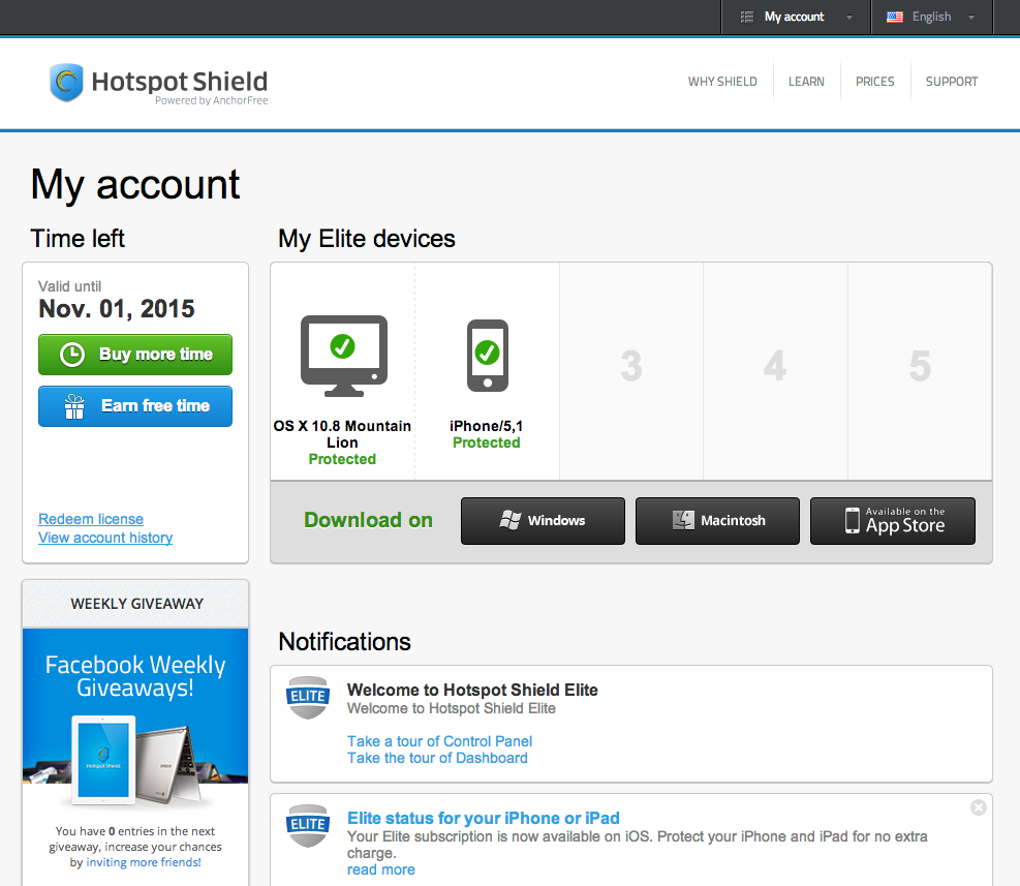
- Secure Purchase History: Your subscription details are stored securely and can be accessed via a protected web portal.
The feature set is clearly aimed at power users who need both privacy and uninterrupted streaming. While the free version offers basic VPN protection, Elite upgrades the experience with faster servers, higher reliability, and extra security tools that make it suitable for both personal and professional use.
Installation, Usage, and Compatibility Across Devices
Setting up Hotspot Shield Elite is intentionally straightforward. After purchasing a subscription, you receive a download link for the appropriate installer. The Windows and macOS clients come as standard executable files, while Android and iOS users can find the app in their respective stores. Once downloaded, the installer guides you through a typical setup wizard: accept the license agreement, choose an installation folder (or the default), and optionally opt out of the optional toolbar that the free version attempts to install. The process usually completes in under two minutes.
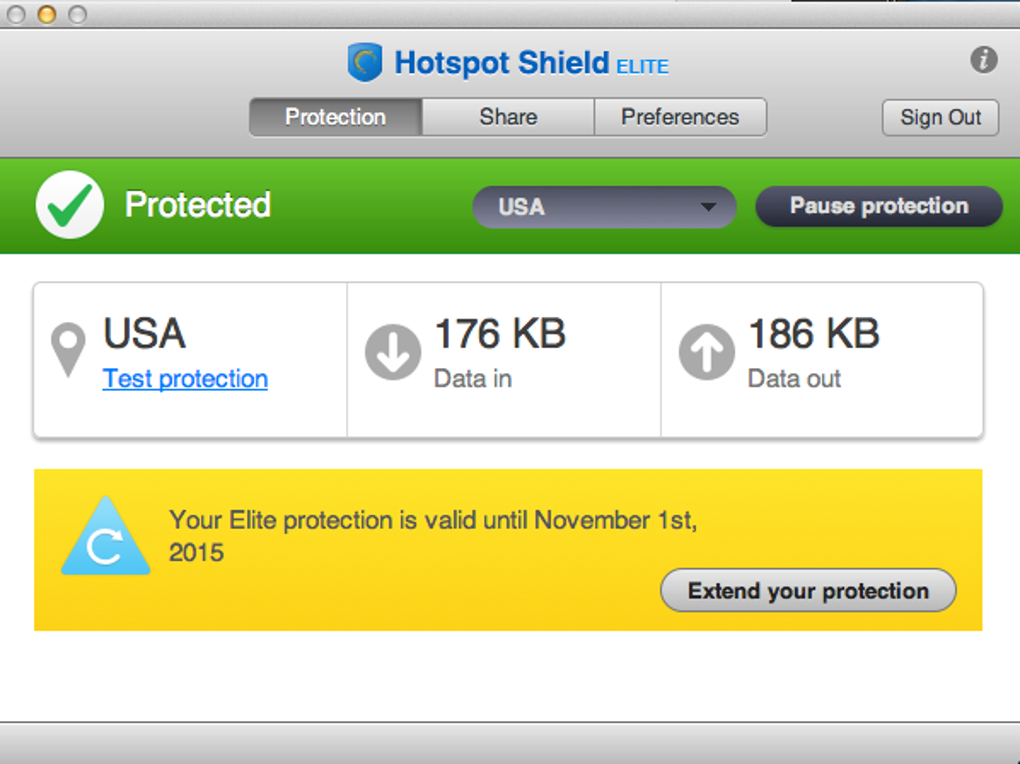
Upon first launch, you’ll be prompted to log in with the credentials you created during purchase. After authentication, the application opens a dedicated browser tab that handles the VPN tunnel. The green shield icon appears in your system tray (Windows) or menu bar (macOS), providing a visual cue that the VPN is active. Clicking the shield toggles the connection on or off, and a simple pop‑up displays your new IP address and location (United States). For mobile devices, the app integrates directly into the OS’s VPN settings, allowing you to enable Hotspot Shield Elite from the control center or notification shade.
Operating System Support (itemprop="operatingSystem"): Hotspot Shield Elite is compatible with the following platforms:
- Windows 10, 11 (64‑bit)
- macOS 10.15 Catalina and later
- Android 7.0 and newer
- iOS 13 and newer (iPhone & iPad)
The application also supports both 32‑bit and 64‑bit architectures on Windows, ensuring broader compatibility with older machines. System requirements are modest: a minimum of 2 GB RAM, 100 MB of free disk space, and a stable internet connection. Because the VPN operates via an extra browser tab, it does not interfere with other network‑intensive applications, making it a good fit for gamers and remote workers who need to keep their primary connection unaltered.
After connecting, you can test the service by visiting a “what is my IP” website to confirm that your visible IP now originates from the United States. From there, accessing Hulu, Pandora, or region‑locked YouTube videos becomes as simple as navigating to the site and signing in. If you experience any slowdown, the app’s settings panel offers a “Switch Server” button that forces a manual reconnection to an alternative U.S. node, often resolving any temporary congestion.
Pros, Cons, and Frequently Asked Questions
Pros
- Fast, dedicated streaming servers minimize buffering on popular services.
- Robust 128‑bit SSL encryption protects data on public Wi‑Fi.
- Ad‑free experience compared to the free tier.
- Built‑in malware protection adds an extra security layer.
- One‑click connection with clear visual status indicators.
- Cross‑platform support ensures seamless usage on Windows, macOS, Android, and iOS.
- No data caps allow unlimited streaming and downloading.
Cons
- Only U.S. server locations; no choice for other countries.
- Subscription cost is higher than many competing VPNs.
- Initial connection may be slightly slower than a direct, non‑VPN link.
- Optional toolbar installation can be confusing for new users (though opt‑out is available).
- Customer support response time varies during peak hours.
Frequently Asked Questions
Can I use Hotspot Shield Elite to bypass geo‑restrictions on Netflix?
Hotspot Shield Elite primarily offers U.S. servers, which work well with Hulu, Pandora, and many U.S.-based YouTube videos. While it can sometimes access Netflix US, the service is not specifically optimized for Netflix and may occasionally be blocked. For consistent Netflix access, consider a VPN that offers multiple international locations.
Is the 128‑bit SSL encryption sufficient for protecting sensitive data?
Yes, 128‑bit SSL encryption is widely regarded as secure for everyday browsing, online banking, and data transfers. While some premium VPNs offer 256‑bit encryption, the 128‑bit standard used by Hotspot Shield Elite provides a strong balance of security and performance.
What devices can I protect with a single Hotspot Shield Elite subscription?
A single subscription allows you to install the client on up to five devices simultaneously, including any mix of Windows PCs, macOS computers, Android phones, and iOS tablets.
Does Hotspot Shield Elite keep logs of my browsing activity?
Hotspot Shield Elite follows a strict no‑logs policy for browsing data. The service retains minimal connection logs (e.g., timestamps and bandwidth usage) solely for troubleshooting and network optimization, but does not store URLs, IP addresses, or personal content.
Can I get a refund if I’m not satisfied with the service?
Hotspot Shield Elite offers a 30‑day money‑back guarantee. If you cancel within the first 30 days of your subscription, you can request a full refund through the account portal or by contacting support.
Final Verdict: Is Hotspot Shield Elite Worth the Investment?
Hotspot Shield Elite delivers a compelling mix of security, speed, and user‑friendly streaming capabilities. For users whose primary goal is to access U.S. media services while staying protected on public Wi‑Fi, the service’s dedicated streaming servers and ad‑free experience make it a strong candidate. The one‑click connection model removes the technical barriers that often deter less‑tech‑savvy users, and the inclusion of malware protection adds tangible value beyond a standard VPN.
However, the lack of international server locations and the higher subscription price compared to some competitors may be a drawback for globetrotters who need multi‑country coverage. If your primary focus is unrestricted access to Hulu, Pandora, or U.S. YouTube content, and you value a simple, secure solution, Hotspot Shield Elite is well worth the cost.
Ready to secure your connection and unlock the full library of U.S. streaming services? Download Hotspot Shield Elite today and enjoy a 30‑day money‑back guarantee that lets you test the speed, stability, and security risk‑free.
- Fast dedicated streaming servers
- 128‑bit SSL encryption
- Ad‑free experience
- Malware protection
- Only U.S. server locations
- Higher price point







